Raspberry Pi 3 Model B+: Your Gateway to Advanced Embedded Projects
The Raspberry Pi 3 Model B+ is a powerful and versatile single-board computer that bridges the gap between hobbyist tinkering and serious embedded development.
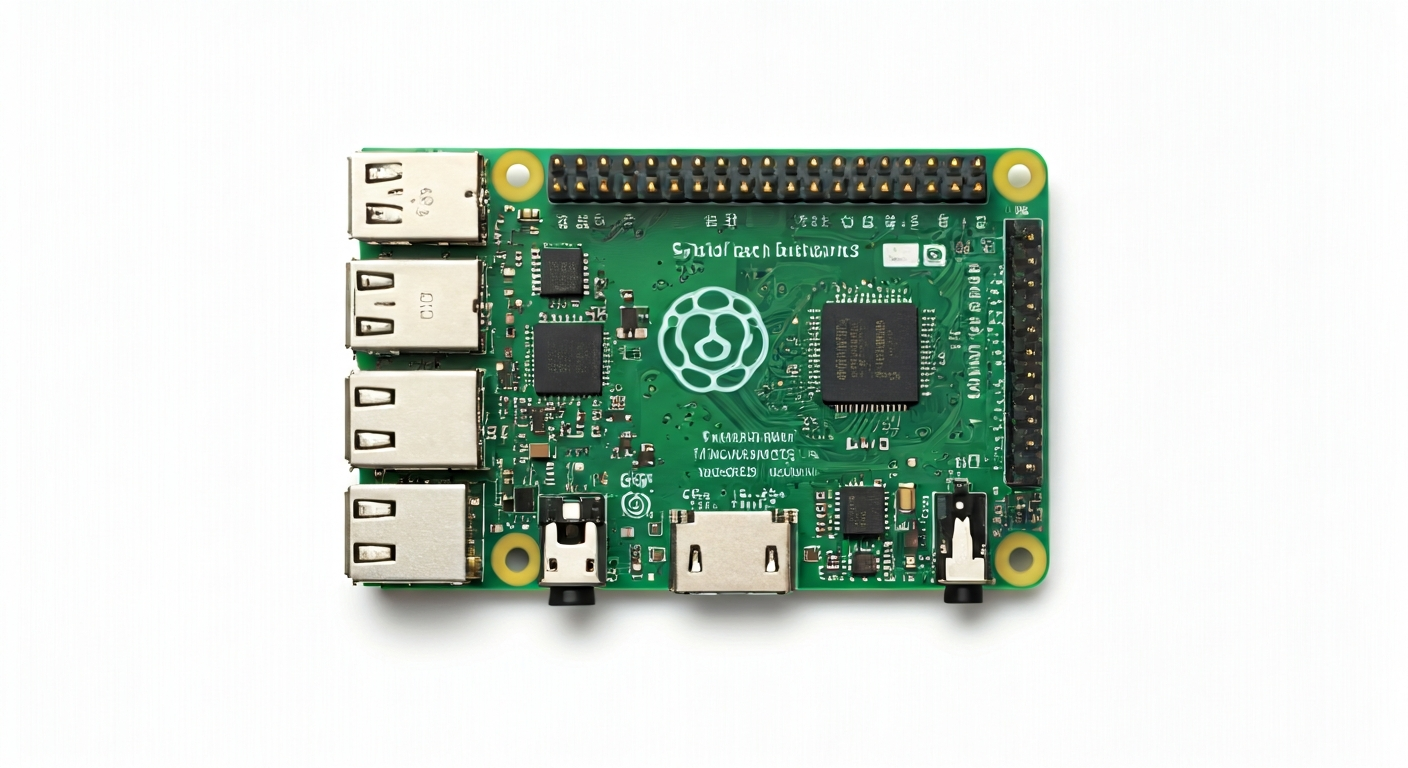
The Raspberry Pi 3 Model B+ (often abbreviated as RPi 3 B+) is a significant iteration in the popular Raspberry Pi family, released in March 2018. It builds upon the success of its predecessors by offering enhanced networking capabilities, improved thermal management, and a more robust power delivery system. This board is designed to be a low-cost, credit-card-sized computer that can be used for a wide range of applications, from educational tools and simple desktop replacements to sophisticated IoT devices and embedded systems.
At its core, the Raspberry Pi 3 B+ features the Broadcom BCM2837B0 System-on-Chip (SoC). This 64-bit quad-core ARM Cortex-A53 processor runs at a clock speed of 1.4GHz, providing a substantial performance boost over previous models. The SoC also integrates a VideoCore IV GPU, enabling high-definition video output and basic 3D graphics processing. This processing power makes the RPi 3 B+ capable of handling more demanding tasks, such as running desktop environments, serving web pages, and processing sensor data in real-time.
Where the RPi 3 B+ truly shines is in its connectivity. It boasts dual-band 802.11ac Wi-Fi and Bluetooth 4.2/BLE, along with Gigabit Ethernet over USB 2.0 (achieving speeds of up to 300Mbps). This enhanced networking makes it ideal for IoT projects, network-attached storage (NAS) devices, and any application requiring reliable wireless or wired communication. The board is powered by a micro USB connector and features a standard 40-pin GPIO header, making it compatible with a vast ecosystem of HATs (Hardware Attached on Top) and expansion boards, further extending its capabilities.
The Raspberry Pi 3 Model B+ is an excellent choice for makers, students, and embedded engineers who need a balance of processing power, connectivity, and I/O flexibility. It's well-suited for projects involving robotics, home automation, media centers, learning programming (Python, C++), and developing prototypes for commercial products. While it runs a full Linux operating system (Raspberry Pi OS), its GPIO pins also allow for direct hardware interaction, making it a powerful platform for both software and hardware experimentation.
Watch
Related video, embedded from YouTube.
Specifications
| Microcontroller / SoC | Broadcom BCM2837B0 |
| Architecture | 64-bit Quad-core ARM Cortex-A53 |
| Clock speed | 1.4GHz |
| Flash / Storage | MicroSD card slot (up to 32GB officially supported, practically much larger) |
| RAM / SRAM | 1GB LPDDR2 SDRAM |
| Operating voltage | 3.3V (for GPIO and most peripherals) |
| Digital I/O pins | 40 (configurable as input or output) |
| Analog / ADC | None (requires external ADC module) |
| PWM | Hardware PWM on specific GPIO pins (e.g., GPIO12, GPIO13, GPIO18, GPIO19) |
| Connectivity | Dual-band 802.11ac Wi-Fi, Bluetooth 4.2/BLE, Gigabit Ethernet (via USB 2.0, max ~300Mbps) |
| USB | 4 x USB 2.0 ports |
| Power input | 5V DC via Micro USB connector (recommended 2.5A minimum) |
| Dimensions | 85mm x 56mm (credit card size) |
Pinout & pin functions
| Pin | Function |
|---|---|
| 3.3V | Power output (3.3V) |
| 5V | Power output (5V) |
| 5V | Power output (5V) |
| GND | Ground |
| GND | Ground |
| GPIO2 | General Purpose Input/Output |
| GPIO3 | General Purpose Input/Output |
| SDA (I2C) | I2C Data line |
| SCL (I2C) | I2C Clock line |
| GPIO4 | General Purpose Input/Output |
| GPIO17 | General Purpose Input/Output |
| GPIO27 | General Purpose Input/Output |
| GPIO22 | General Purpose Input/Output |
| GND | Ground |
| GPIO10 | General Purpose Input/Output (SPI MOSI) |
| GPIO9 | General Purpose Input/Output (SPI MISO) |
| GPIO11 | General Purpose Input/Output (SPI SCK) |
| GND | Ground |
| GPIO5 | General Purpose Input/Output (SPI CE0) |
| GPIO6 | General Purpose Input/Output (SPI CE1) |
| GPIO13 | General Purpose Input/Output (PWM0) |
| GPIO19 | General Purpose Input/Output (PWM1) |
| GPIO26 | General Purpose Input/Output |
| GPIO7 | General Purpose Input/Output |
| GPIO8 | General Purpose Input/Output |
| GPIO25 | General Purpose Input/Output |
| GPIO24 | General Purpose Input/Output |
| GND | Ground |
| GPIO12 | General Purpose Input/Output (PWM0) |
| GPIO16 | General Purpose Input/Output |
| GPIO20 | General Purpose Input/Output (I2S TX) |
| GPIO21 | General Purpose Input/Output (I2S RX) |
| GND | Ground |
| GPIO18 | General Purpose Input/Output (PWM1) |
| GPIO23 | General Purpose Input/Output |
| GPIO15 | General Purpose Input/Output (PWM2) |
| GPIO14 | General Purpose Input/Output (PWM2) |
| GND | Ground |
| GPIO28 | General Purpose Input/Output |
| GPIO29 | General Purpose Input/Output |
| GPIO30 | General Purpose Input/Output |
| GPIO31 | General Purpose Input/Output |
| GND | Ground |
| GPIO32 | General Purpose Input/Output |
| GPIO33 | General Purpose Input/Output |
| ID_SD | EEPROM Serial Data |
| ID_SC | EEPROM Serial Clock |
Wiring & circuit basics
Powering the Raspberry Pi 3 Model B+ requires a stable 5V DC supply with a minimum current rating of 2.5A, delivered via the micro USB port. Using an underpowered supply can lead to instability, data corruption, and unexpected shutdowns. The board has onboard voltage regulators to step down the 5V supply to the 3.3V required by the SoC and many peripherals. It's crucial to use a dedicated, high-quality power supply designed for Raspberry Pi or similar devices. Avoid powering the board through its USB ports from a computer, as this is often insufficient.
The Raspberry Pi 3 B+ operates at 3.3V logic levels. This means that digital signals sent to or received from the GPIO pins will be either 0V (low) or 3.3V (high). Connecting a 5V device directly to a GPIO pin can damage the Raspberry Pi. If you need to interface with 5V components (like many common LEDs, buttons, or older sensors), you will need a level shifter. For example, to safely blink an LED, connect the anode (longer leg) of the LED to a GPIO pin through a current-limiting resistor (e.g., 330 Ohm) and the cathode (shorter leg) to a Ground (GND) pin.
When connecting sensors, always consult their datasheets for voltage requirements and logic levels. For I2C communication, connect the sensor's SDA pin to the Raspberry Pi's SDA (GPIO2) and the sensor's SCL pin to the Raspberry Pi's SCL (GPIO3). Ensure the sensor also shares a common ground with the Raspberry Pi. Many I2C sensors require a pull-up resistor on both SDA and SCL lines; some breakout boards include these, while others require external resistors (typically 4.7k Ohm to 10k Ohm) connected to the 3.3V rail.
Programming & getting started
The Raspberry Pi 3 Model B+ runs a full Linux operating system, typically Raspberry Pi OS (formerly Raspbian). This allows for a wide range of programming environments. For hardware interaction, Python with libraries like RPi.GPIO or gpiozero is extremely popular and beginner-friendly. You can install Raspberry Pi OS on a microSD card, boot the Pi, and then use the built-in Thonny IDE to write and run Python scripts. Alternatively, for more advanced applications, you can use C/C++ with libraries like wiringPi or libgpiod, or develop directly within the Linux command line.
For those familiar with the Arduino ecosystem, PlatformIO, an open-source IDE extension for VS Code, offers excellent support for the Raspberry Pi. It allows you to write code in C/C++ or MicroPython and manage dependencies efficiently. To upload your first program, after setting up your Raspberry Pi OS, open a terminal, navigate to your project directory, and use a command like `python your_script.py` to run a Python script, or compile and execute C/C++ code. For MicroPython, you'll typically flash a MicroPython firmware onto a separate SD card or use tools like `mpremote`.